Short answer: should you run your own VPN or proxy on a VPS?
Run your own server if you need a stable address in a chosen country, want control over the server, and will maintain it. Do not do it for anonymity or streaming. A personal server moves your trust from your internet provider to your host, and the server is still rented in your name.
- Good fit: checking your own sites from another country, a known address for allowlists, a small team that needs one exit point.
- Bad fit: anonymity, streaming libraries, rotating addresses, no time for updates.
To test the advice around this topic, we transcribed and compared 16 videos from 16 YouTube channels. This guide shows what those creators deploy, where they disagree, and who paid for the videos.
Disclosure: I make CozyNode, a free open-source Chrome proxy that runs on a VPS you rent. It is one option in this guide, and none of the 16 videos covers it. We earn nothing from any host or video named here.
What do 16 video creators actually deploy?
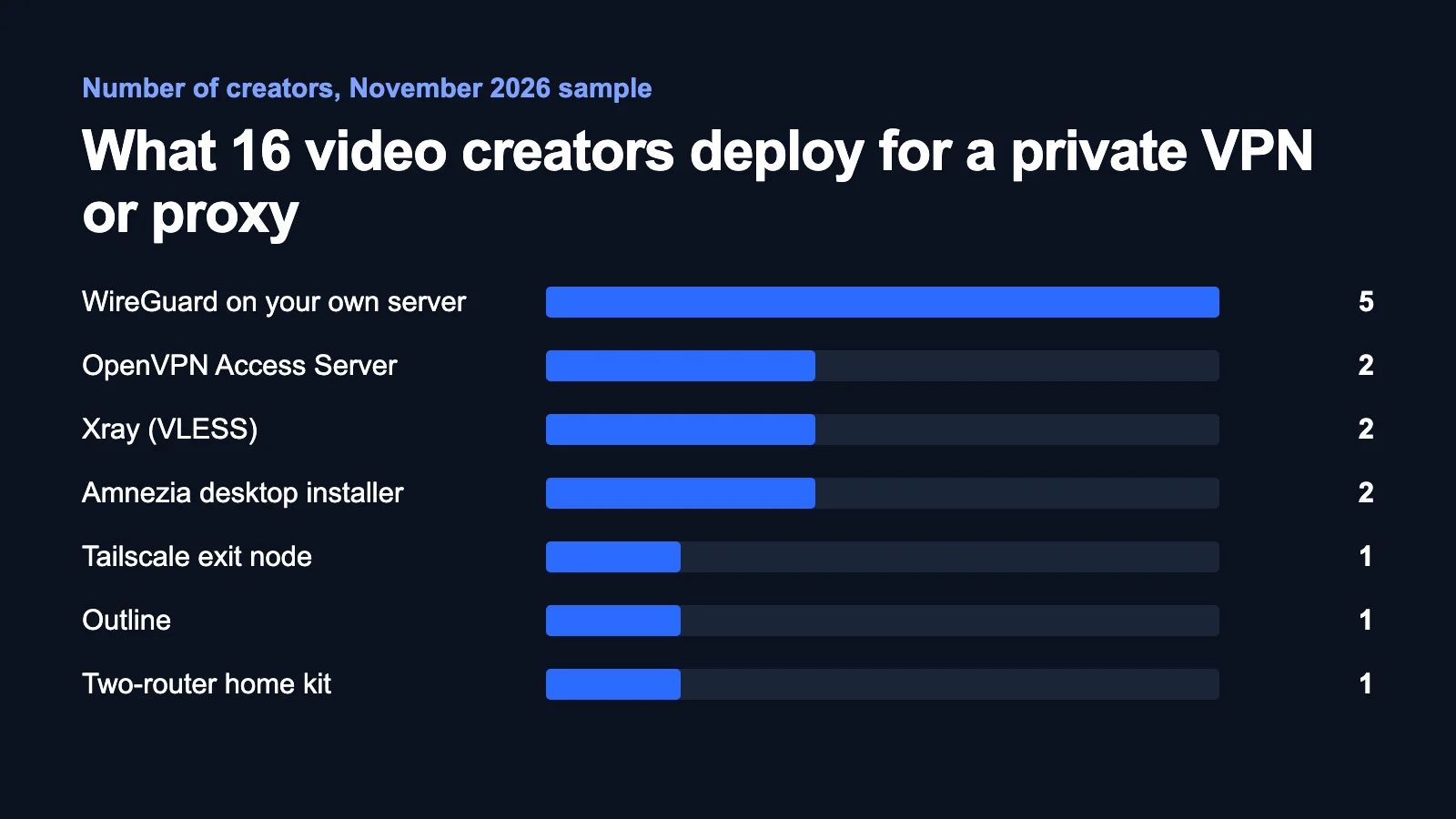
WireGuard on a rented or home server is the clear favourite: 5 of the 16 creators build it. 13 creators deploy something, and 3 only discuss whether you should.
| Setup | Score | Creators | Views | Newest video | VPS and home |
|---|---|---|---|---|---|
| WireGuard on your own server | 97 | 5 | 288,227 | 2026 | Yes |
| OpenVPN Access Server | 64 | 2 | 56,131 | 2026 | Yes |
| Xray (VLESS) | 63 | 2 | 20,501 | 2026 | Yes |
| Tailscale exit node | 52 | 1 | 1,351,050 | 2025 | Yes |
| Amnezia desktop installer | 46 | 2 | 38,979 | 2025 | No |
| Outline | 34 | 1 | 14,283 | 2025 | No |
| Two-router home kit | 34 | 1 | 12,302 | 2025 | No |
The score runs from 0 to 100. Creators count for 50%, each channel once. Views count for 25% on a log scale, the newest video for 15%, and working on both a VPS and home hardware for 10%. Websplaining appears twice because it installs Xray through Amnezia.
Read the table as a map of this sample, not as a market survey. We chose these 16 channels from 152 search results to cover different angles. Tailscale scores well because of one very popular video.
One gap stands out. None of the 16 shows a ready-made proxy that covers only the browser. LinuxCloudHacks is the only one who points a browser at a proxy by hand, and that setup also needs a domain and a web server.
Who can see your traffic once you have your own server?
Your own server changes who can see your traffic, but somebody always can. IBM Technology frames every VPN choice as a choice of whom to trust, and that includes a VPN you bring yourself, because you still trust the software.

| Who is looking | Without your server | With your server |
|---|---|---|
| Local Wi-Fi or internet provider | Sites you visit, plain HTTP content | An encrypted connection to your server |
| Your host | Nothing | Destinations, timing, volume, plain HTTP content |
| The website | Your address, logins, fingerprint | The server's address, the same logins and fingerprint |
| A legal authority over the host | Nothing from this host | Billing details and any records kept |
HTTPS already hides page content. NetworkChuck shows in a packet capture that the site names can stay visible even with secure DNS. A tunnel hides them from your local network. NetworkChuck also estimates that your address is only about 5% of how you get tracked, because cookies and browser fingerprints do the rest. Both creators add that a VPN cannot stop malware or phishing.


Do you need a proxy or a VPN?
The choice comes down to what must be covered. A browser proxy routes browser traffic, and a VPN routes the whole device. Both can run on the same rented server.

| Browser proxy | VPN on the device | |
|---|---|---|
| Covers | The browser, or only selected sites | Apps, background services, system DNS |
| Good for | Geo-checks and per-task work | Untrusted Wi-Fi and apps that need the server's address |
| Downside | Other apps stay on your normal connection | Updates and logins all leave from one address and use your traffic |
| Watch for | A plain HTTP or SOCKS5 proxy is not encrypted on its way to the server | IPv6 can bypass the tunnel |
Rule: if only browser work needs the address, start with a browser proxy. If anything outside the browser must be covered, use a VPN.
When is a personal server worth it, and when is it not?
VPN Info makes the strongest case against. It argues that one address that traces back to you is less private than a crowd, and that the savings are smaller than people expect. The channel earns from commercial VPN links, but the first point holds regardless. CyberFlow, who recommends building your own, says the same about anonymity.
Linus Tech Tips adds two practical limits: streaming services aggressively block data-center addresses, and big cloud hosts forward torrent complaints to you. Some apps also use your app store region or GPS, so a new address does not always change your location.
| Worth it | Not worth it |
|---|---|
| You check your own sites, prices and landing pages from another country | You need anonymity, or you face a capable adversary |
| An admin panel or client system allows only one known address | You want another country's streaming library |
| A small team needs one shared exit, with a login per person | You need many locations or rotating addresses |
| You want to decide what the server logs | Nobody will install updates |
If you are at high risk, follow specialist guidance and tools built for that risk. A rented server linked to your payment details is the wrong tool.
Where do the creators disagree?
The 16 videos conflict on five points. In each case the last column gives our reading.
| Question | One side | Other side | Our reading |
|---|---|---|---|
| Streaming | AyyazTech: a personal address is blocked less often | Linus Tech Tips and VPN Info: data-center ranges are blocked in bulk | Do not buy a server for this |
| One address | AyyazTech and VPN Info: clean, not shared with strangers | VPN Info and CyberFlow: all traffic points to one customer | Both are true, so the job decides |
| Savings | AyyazTech: about $5 against $13 to $15 a month | VPN Info: savings shrink on long commercial plans | Count your hours too. We did not check commercial prices |
| Effort | AyyazTech: about 2 minutes with a preinstalled panel | CyberFlow: about 40 minutes. David Bombal: a 37-minute video with server hardening | Installing is quick. Securing and maintaining the server is the real work |
| Protocol | David Bombal and CyberFlow: WireGuard is lean and modern | Grant Collins: OpenVPN for reliability, access control and TCP support | WireGuard for one person. OpenVPN if you need access rules for a team |
How does each setup work, and which video shows it?
Each entry below gives the setup, what it needs, and the limit its creator warns about. Prices are what the creators said on camera, so check current prices in our VPS price guide.
WireGuard on a rented server
You install WireGuard, exchange public keys between server and device, and turn on forwarding and address translation on the server. David Bombal does every step by hand on a 2 GB Linode plan and measures about 98 Mbit/s over Starlink. Tony Teaches Tech uses a popular community install script on a $4 Kamatera server. AyyazTech picks a preinstalled panel on Hostinger and warns that the install wipes the server. CyberFlow gives the short version for about $5 a month and suggests adding Pi-hole.


WireGuard as a hub for your home server
PageKey rents a $5 AWS Lightsail server as the meeting point. The home server connects outward and has no listening port, so the home router needs no port forwarding. This suits private access to your own devices.

Tailscale exit node
Linus Tech Tips puts everything in one config file on a $6 Vultr server. Tailscale, which is built on WireGuard, handles login and keys, and updates run on their own. You trust Tailscale's coordination service, and you must disable key expiry, or the server drops off after 180 days.
OpenVPN Access Server
This is a server with a web admin panel, user management and two free connections. Grant Collins runs it on a Raspberry Pi and insists that the admin port stays off the internet. 2GuysTek runs it on a home Proxmox server in a sponsored video. It is open about the trade-off: more setup and upkeep than mesh VPNs, but no third-party coordination server.

Amnezia
You give a desktop app the server's address and login, and it installs everything over SSH. DB Tech shows this on a RackNerd server, on a sale price of $11.11 a year, in a video sponsored by Amnezia. DB Tech warns that you get one address per server, that hardening the server stays your job, and that many leak-test sites also sell VPNs. Websplaining uses it on DigitalOcean and recommends 2 GB, with 1 GB as the minimum.


Outline
Outline, built on Shadowsocks, has a manager app that creates access keys and sets a data limit per person. Blue Falcon runs it on 1 CPU and 1 GB of RAM. Blue Falcon warns that some government firewalls can detect its traffic.

Xray behind a real website
Xray is for networks that block VPN traffic. LinuxCloudHacks hides it behind nginx on a real site with a real domain and certificate, so an observer sees the domain but not the path. It takes the most work of any setup here. LinuxCloudHacks also notes that Cloudflare's terms prohibit running this through its tunnels. We do not cover the configuration in this guide. Check your local law and your host's terms first.
Should the server live at home or in a data center?
Choose by the address you need. A home server gives you your home address, and a VPS gives you a data-center address in the country you pick.

| Home hardware | Rented VPS | |
|---|---|---|
| Address websites see | Your home address | A data-center address |
| Change country | No | Yes, by choosing the location |
| Main blocker | CGNAT means you have no public address to reach | Some sites refuse data-center ranges |
| Speed limit | Your home upload speed | The plan's port and traffic limit |
| Best job | Reaching your own network, looking like you are at home | Geo-checks and a stable public address |
Grant Collins and 2GuysTek both warn about CGNAT, which 2GuysTek says includes Starlink. Grant Collins adds that a home server cannot make you appear in another country.
Sarb Johal reviews a two-router kit that carries your home address on the road. The kit appeals because one bank in that review refuses VPN addresses. It needs a box at home that is on all the time and at least 30 Mbit/s of upload, and it has a subscription after the first 3 months. The review carries a discount code.
What must you do after the install?
An unmaintained server is the biggest risk of this whole approach. The install takes minutes, so do these steps straight after it.
- Lock down SSH. David Bombal creates a normal user, adds a key and turns off root and password login. Tony Teaches Tech leaves the firewall and SSH keys for a follow-up video, so do not stop at the install.
- Open only the ports you use. Never leave a proxy without a login: an open proxy breaks many hosts' rules.
- Make the setup survive a reboot. David Bombal reboots the server to prove the config persists.
- Test the result. Compare the address you see with the server's address, then check DNS, WebRTC and IPv6. David Bombal finds an IPv6 address exposed during the demo and fixes it. Ignore the upsell on leak-test sites.
- Check the traffic limit. DB Tech warns that hosts differ on bandwidth limits. Look at your usage after the first month.
- Set a monthly reminder. Apply updates, review logins, and shut the server down if nobody uses it.
Where does CozyNode fit, and how do you use it?
CozyNode is for the case the videos skip: you need the server's address in Chrome and nowhere else. It is a Chrome extension plus a one-command server installer. It is free open-source software under the MIT license, and you pay only for the VPS.
What people use it for
| Job | How to set it up |
|---|---|
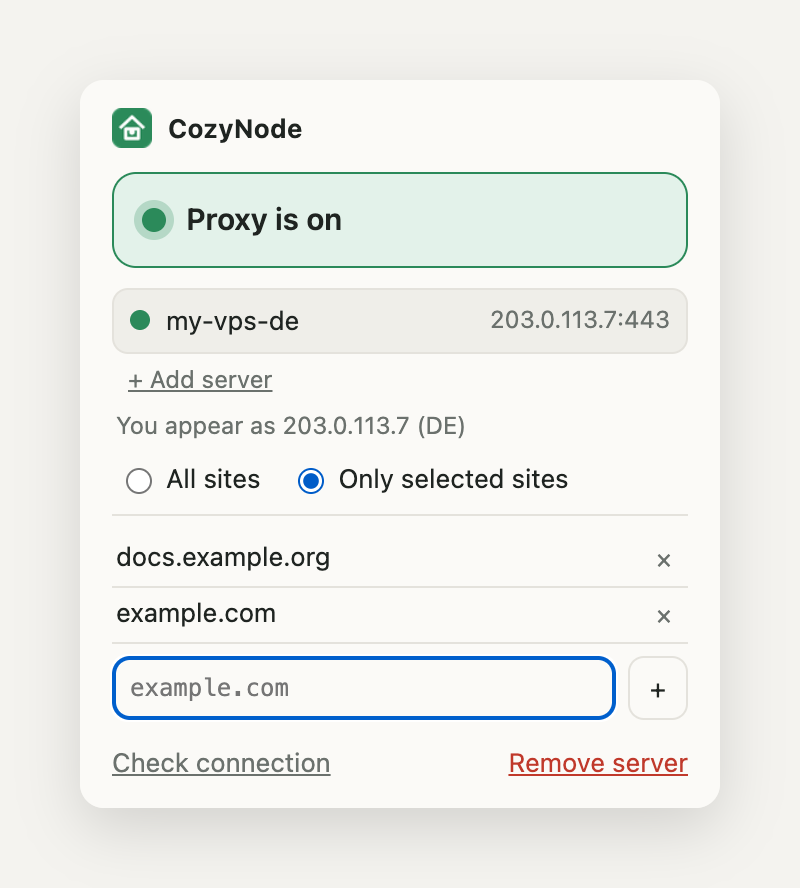
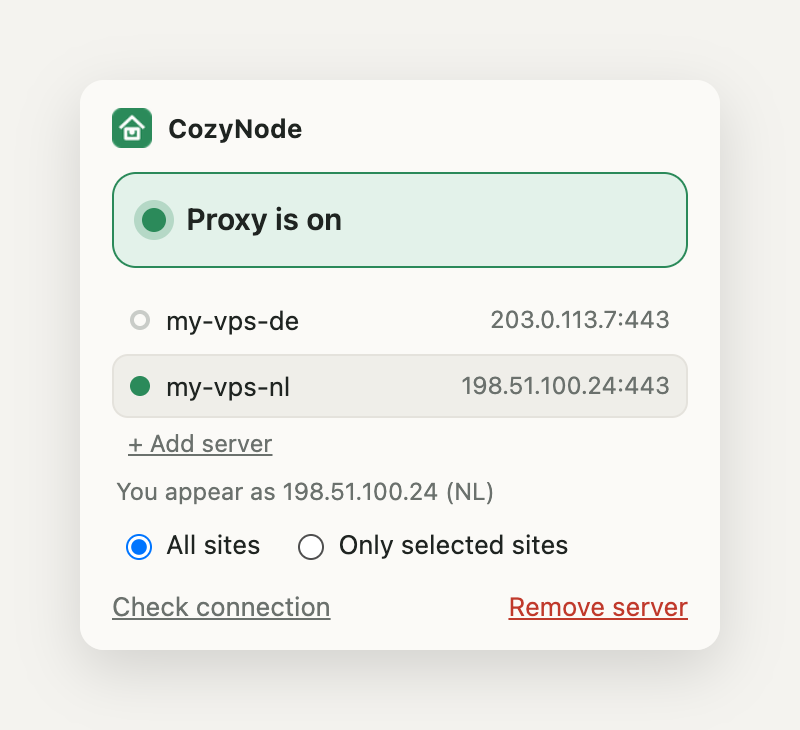
| Check your site, prices or redirects from another country | Route only those sites through the server and leave the rest direct |
| Reach an admin panel that allows one address | Add the panel's domain to your selected sites and allow the server's address |
| Compare two countries | Add two servers and switch in one click, or give a site its own server |
| Share one exit in a small team | Give each person a login with sudo cozynode add-user |
| Use the same server on a phone | Create a profile with sudo cozynode ios-profile for the third-party sing-box app |
How to set it up
- Rent a Linux VPS with Ubuntu or Debian. Our guide says 512 MB of RAM is enough. The server's country is the country websites will see. Use our VPS price guide to choose.
- Open TCP 443 (or 8443) and TCP 80 in your provider's cloud firewall, if it has one.
- Connect over SSH and run the installer. You can read the script first.
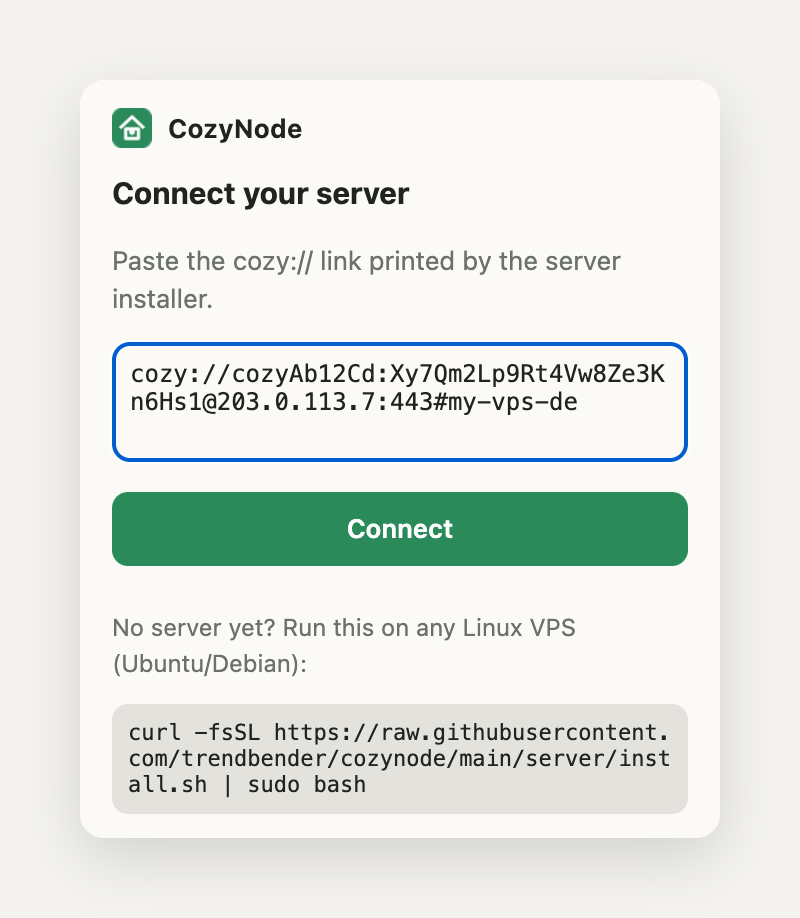
curl -fsSL https://raw.githubusercontent.com/trendbender/cozynode/main/server/install.sh | sudo bash - Copy the link it prints. Treat it like a password: anyone who has it can use your server. If it leaks, run
sudo cozynode rotate. - Install the extension from the CozyNode page and paste the link.
- Choose all sites or only some, then confirm the address changed. The step-by-step guide has screenshots and troubleshooting.
root@my-vps:~# curl -fsSL https://raw.githubusercontent.com/trendbender/cozynode/main/server/install.sh | sudo bash
==> downloading sing-box 1.14.3 (amd64)
==> ufw: opened 443/tcp
!! if your provider has a cloud firewall (Hetzner, AWS, Oracle...), allow TCP 443 and 80 there too
==> waiting for the TLS certificate (Let's Encrypt, up to 90 s)
==> certificate is ready
==> self-test passed: traffic goes through the proxy

  Connection link (paste it into the CozyNode extension):

  cozy://cozyAb12Cd:[email protected]:443#my-vps

  Keep it secret: anyone with this link can use your server.
  Later: sudo cozynode link | add-user | ios-profile | status | uninstall
What we measured
- Speed: on 30 October 2026 we measured about 100 Mbit/s on one route, the same as the direct connection. That is one route, not a benchmark.
- Acceptance: on 5 November 2026 we opened six sites through one of our data-center addresses in real Chrome. Five opened. A large retailer with strong anti-bot protection refused.
What it does not do
CozyNode covers Chrome only, not other apps on the computer. HTTP/3 does not go through it, so Chrome falls back to TCP. On phones it carries TCP and DNS only. It does not make you anonymous, rotate addresses or improve the reputation of a data-center address. In "selected sites" mode, sites outside your list use your normal connection and DNS. If you need the whole device covered, choose WireGuard.
What does it really cost?
The rental is usually the small part of the cost, because your time counts too. Use this formula with your own numbers:
Monthly cost = rental + expected overage + (setup hours / months of planned use + monthly upkeep hours) × your hourly rate.
As an illustration, take a $5 rental, 3 setup hours over 12 months, 1 upkeep hour and a $50 rate. That gives $5 + (0.25 + 1) × $50 = $67.50 a month. The example is not a market price. It shows why a paid alternative can be cheaper if you use the server rarely.

For rental prices, read Cheapest VPS for a Personal VPN or Proxy, or open the full price table. We took those prices from official pages on 6 November 2026.
FAQ
Does my own VPS make me anonymous?
No. The server is rented in your name, the host keeps billing records, and websites still see your logins, cookies and browser fingerprint. It gives you control over the exit server, not anonymity.
Should I choose a browser proxy or a VPN?
Choose by what must be covered. If only browser work needs the server's address, a browser proxy is enough. If apps, system DNS or an untrusted network must be covered, use a VPN such as WireGuard.
Which self-hosted setup is the most common?
In our sample of 16 channels, WireGuard on a rented server was the most common, with 5 creators. The sample is our selection from 152 YouTube results, not a census.
Will a VPS work for streaming?
Do not plan on it. Linus Tech Tips and VPN Info both say streaming services block data-center addresses. One creator expects fewer blocks on a personal address, so test your own service before you rely on it.
How much does a personal VPS cost?
On 6 November 2026 we found $3.50 a month in one location at Vultr, $4.00 at DigitalOcean, and $24.00 a year prepaid at BuyVM. Our VPS price guide lists 14 plans and their catches.
Which videos did we use, and who paid for them?
10 of the 16 videos have a named commercial tie to what they show or recommend: a sponsor, an affiliate link, a discount code or the creator's own product. Three more carry other promotions in the description, shown in the table. That does not make them wrong. Our own tie is CozyNode, as disclosed above. We list what we could see in each video and its description on 6 November 2026.

| Creator and video | Published | Views | Commercial tie we could see |
|---|---|---|---|
| Linus Tech Tips: I Made a Personal VPN to Access EVERYTHING… and You Can Too! | February 2025 | 1,351,050 | Vultr is not a sponsor. The video sponsor is a projector maker, and the description also promotes PIA VPN. |
| IBM Technology: Do VPNs Really Protect Privacy? | December 2025 | 501,868 | Description promotes a paid IBM exam. No VPN product. |
| NetworkChuck: I was wrong about VPNs | June 2026 | 245,326 | Sponsored by NordVPN. |
| David Bombal: Host Your Own (WireGuard) | June 2025 | 132,537 | Says the host is not a sponsor. The description says links may be affiliate links. |
| Tony Teaches Tech: How to Set Up a WireGuard Server | June 2025 | 87,883 | Affiliate link to Kamatera. |
| Grant Collins: Stop Trusting VPN Companies | February 2026 | 49,537 | Redirect link to OpenVPN in the description. |
| CyberFlow: How To Create Your OWN VPN (and why) | July 2026 | 36,638 | Description promotes the channel's own courses. No tie to a VPN or host found. |
| DB Tech: Amnezia: A Self-Hosted VPN | November 2024 | 29,922 | Sponsored by Amnezia. Free server and affiliate links from RackNerd. |
| PageKey: How to Build Your Own VPN (WireGuard + VPS) | July 2026 | 27,838 | Sells its own VPN and hardware. |
| Blue Falcon: How to Set Up Outline VPN Server | June 2025 | 14,283 | Affiliate link to a host. |
| Sarb Johal: Why I Switched to a PRIVATE VPN for Travel | November 2025 | 12,302 | Discount code for the reviewed product. |
| LinuxCloudHacks: How to Hide a Proxy Inside a Real Website | January 2026 | 11,444 | None found in the video or description. |
| Websplaining: XRay VLESS REALITY Proxy Using Amnezia | June 2025 | 9,057 | Affiliate links to DigitalOcean and Amnezia. |
| 2GuysTek: The Self-Hosted VPN You Should Be Using! | June 2026 | 6,594 | Sponsored by OpenVPN. |
| AyyazTech: Your Own VPN for $4/Month | January 2026 | 3,331 | Affiliate link to Hostinger. |
| VPN Info: Should You Build Your Own VPN? | October 2026 | 839 | Affiliate links to commercial VPNs. |
We searched YouTube, transcribed the audio with Whisper, and retold the points in our own words. Machine transcripts can mishear names, so open the video before you copy a command.
What to do this week
- Write down the job, the country you need and what must be covered.
- Choose a browser proxy or a VPN, using the rule above.
- Pick a plan from our VPS price guide and read that host's acceptable use policy.
- Rent the server for one month, secure it, test it, and check your traffic at the end of the month.
If your work happens in Chrome, try CozyNode, the free open-source proxy I make. You pay only for the server.
Comments
We review every comment before it appears. Your email is never shown. Privacy policy