Short answer: do you have to pay for Fancybox?
Yes, for any live site running the current version. On 6 November 2026 the Fancybox licence agreement says "every installation", whatever the project type, needs a valid paid licence, and prices start at €29. You can try it free on development and staging servers.
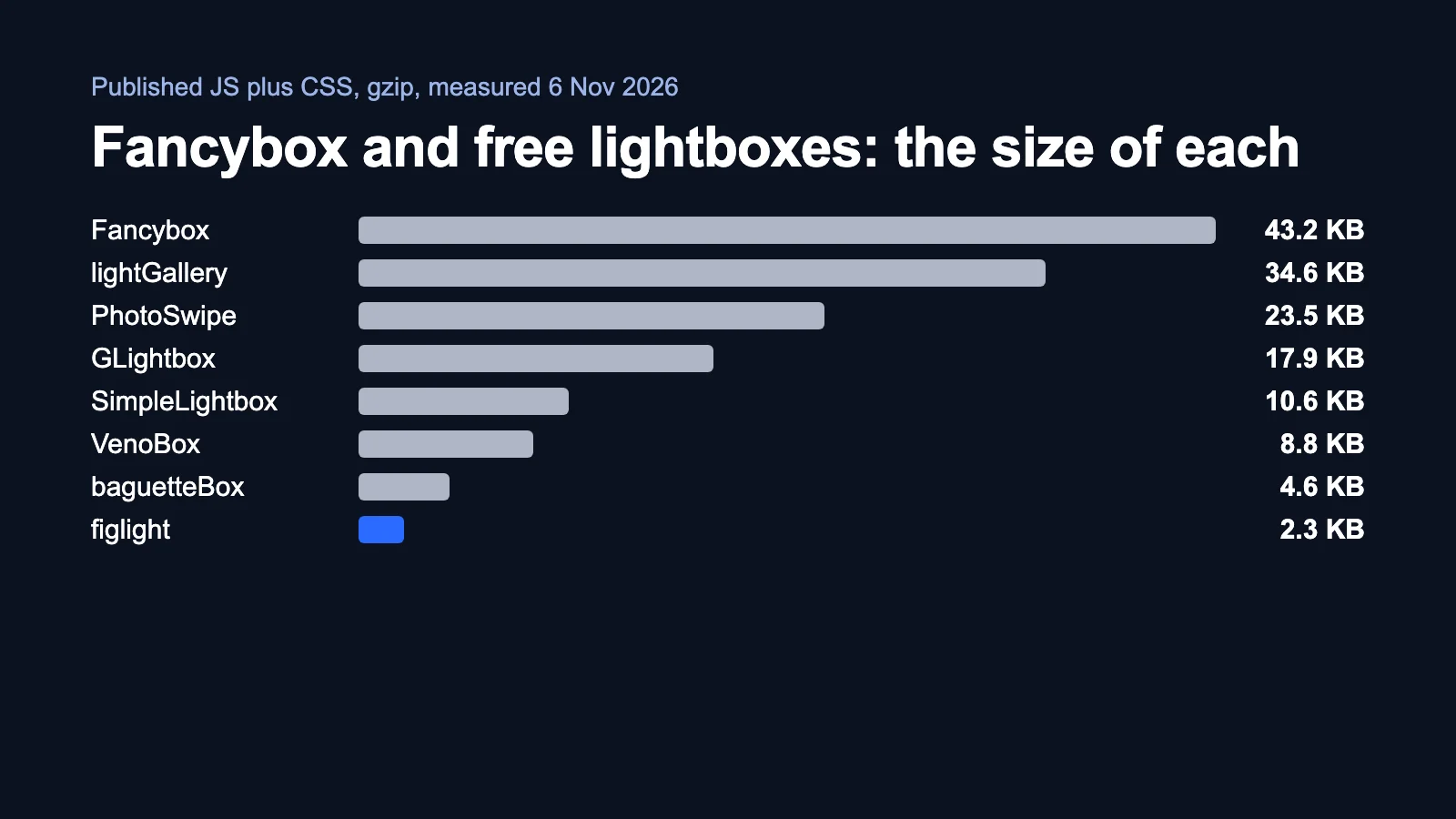
The old advice, "it is free under GPLv3 unless your site is commercial", now fits only the 2019 jQuery package. If you want a free replacement today, PhotoSwipe and GLightbox are the established choices. If your pages only need photos with captions, there is also figlight, a 2.3 KB library I wrote. It does far less than Fancybox, and this article says where that matters.
What does the Fancybox licence actually say?
Three points decide most cases. I read them on the licence page and the pricing page on 6 November 2026.
- Every live installation needs a paid licence. The agreement does not make an exception for small or non-commercial sites.
- Development and staging are covered. You can run unpaid copies for development use when they support a licensed live site.
- Open source projects need permission. The restrictions list bars using the software in open source projects without the author's prior written consent. If you ship a theme or a template on GitHub, read this part first.
| Licence | Price | End products |
|---|---|---|
| Single | €29, one payment | 1 |
| Extended | €99 a year | Unlimited, 1 end user each |
| Business | €399 a year | Unlimited, unlimited end users |
Those prices are fair for what you get. Fancybox handles images, video, iframes, Ajax content and PDF, with zoom, thumbnails and a configurable toolbar. If an expired subscription worries you, the pricing page says existing projects keep working. I am not a lawyer, so treat this as a reading of public pages, not legal advice.
Is the old GPL version of Fancybox still an option?
It exists, and people still install it. The package @fancyapps/fancybox is at version 3.5.7, published in March 2019. Its npm licence field says GPL-3.0, and it needs jQuery. It was downloaded 42,206 times in the week to 4 November 2026, against 123,215 for the current @fancyapps/ui.
I would not start a new project on it. It has had no release in over seven years, it brings jQuery with it, and the GPL has obligations of its own that you should read before you rely on it.
How do you check which Fancybox your site runs?
- Search your
package.jsonfor@fancyapps/uior@fancyapps/fancybox. The first is the current line, the second is the old one. - Run
npm ls @fancyapps/uito see the exact version, including copies pulled in by a theme. - Open
LICENSE.mdinsidenode_modules/@fancyapps/ui. Terms can differ between versions, so read the one you actually ship. - No npm? Search your templates for
data-fancyboxand look at the script address they load. CDN addresses usually carry the version number. - Check who installed it. Themes and page builders often bundle it, and their licence may or may not cover you. Ask the vendor.
Which free lightbox libraries can replace it?
All of these except lightGallery are MIT, so a commercial site pays nothing. Size means the published JS plus CSS from npm, compressed with gzip -9, measured on 6 November 2026. Authors quote smaller numbers (GLightbox says 11 KB, baguetteBox says about 3.2 KB), so test the files you actually load.

| Licence | Zoom | Video | Captions | npm, week to 4 Nov | Latest release | |
|---|---|---|---|---|---|---|
| Fancybox 6.1.15 | Paid for live sites | Yes | Yes | Yes | 123,215 | Current |
| PhotoSwipe 5.4.4 | MIT | Yes | Not in its docs | Code or plugin | 819,305 | May 2024 |
| GLightbox 3.3.1 | MIT | Yes | Yes | Title and description, HTML allowed | 80,367 | Jan 2025 |
| baguetteBox 1.13.0 | MIT | Not in its docs | Not in its docs | title or data-caption | 8,830 | Nov 2025 |
| figlight 1.0.1 | MIT | No | No | Reads figcaption, keeps HTML | New | Nov 2026 |
lightGallery is not a free pass either: its npm licence field reads GPL-3.0 or commercial, so check its terms the way you would check Fancybox. On React, yet-another-react-lightbox is MIT and has 979,497 weekly downloads.
Which one fits which job?
| Your job | Start with | Why |
|---|---|---|
| Everything Fancybox does, and you are happy to pay | Fancybox | The widest feature set here, and €29 is cheap against rebuilding it. |
| Images and video, free | GLightbox | Handles images, video, iframes and inline content with zoom. |
| Large photos with smooth zoom, free | PhotoSwipe | The most used here. Captions take extra work. |
| A small gallery with attribute captions | baguetteBox | 4.6 KB, swipe support, simple setup. |
Photos that already have a figcaption | figlight | 2.3 KB, one script tag, no markup changes if you use figure. |
What does figlight do, and where does it fall short?
I wrote figlight because our articles publish photos from Wikimedia Commons and Unsplash, and those credits have to stay visible. It takes the figcaption your page already has and shows it under the enlarged photo as HTML, so author names and licence links stay clickable. Installation is one line:
<script src="https://cdn.jsdelivr.net/gh/trendbender/[email protected]/dist/figlight.min.js"></script>It also uses the largest srcset image, skips icons under 400 pixels, supports arrow keys and swipe, and returns focus on close.
It has clear limits. There is no zoom, so a reader cannot pinch into a detail on a phone. There are no thumbnails, video, iframes or themes. It is also new: the code is on GitHub, its tests run in jsdom rather than on real devices, and it has few users so far. If any of that matters for your site, choose GLightbox or PhotoSwipe.
How do you move a page from Fancybox to figlight?
- List what you use. If the page opens video, iframes or PDF, or readers need zoom, stop here and use GLightbox.
- Change the markup. Fancybox usually wraps images in
<a data-fancybox href="big.jpg">. figlight treats an image inside a link as a link and leaves it alone, so use<figure><img><figcaption>and put the large file insrcset. - Move the captions. Copy each
data-captionvalue into thefigcaption. - Remove Fancybox. Delete its script, stylesheet and the
Fancybox.bindcall. - Add figlight and test. Add the script tag, then try a phone and a keyboard before you ship.
FAQ
Is Fancybox free?
Not for live sites. On 6 November 2026 its licence requires a paid licence for every installation, from €29. Development and staging servers that support a licensed site are allowed.
Is Fancybox still GPL?
Only the old @fancyapps/fancybox package, version 3.5.7 from 2019, which needs jQuery, has a GPL-3.0 licence field. The current @fancyapps/ui package points to its own licence.
Does a non-commercial site need a Fancybox licence?
The agreement says every installation needs one, whatever the project type, and it names no exception for non-commercial sites. Ask the author if your case is unclear.
What is the best free alternative to Fancybox?
It depends on the job. GLightbox covers images and video, PhotoSwipe is the most used for photos, and figlight is the smallest option here for pages that already have figcaption.
Is figlight a full replacement for Fancybox?
No. It has no zoom, thumbnails, video or iframes. It shows photos with their captions and nothing else.
Sources
- Fancybox licence agreement and pricing, read 6 November 2026.
- Fancybox features, version 6.1.15.
- PhotoSwipe, GLightbox and baguetteBox documentation.
- npm registry for versions, licence fields, release dates and weekly downloads, 6 November 2026.
- Sizes: our own measurement of the published npm files.
What to do this week
- Run the five checks above and write down which version each of your sites ships.
- If you run the current Fancybox on a live site without a licence, buy one or plan the move.
- Try the figlight demo if your pages are photos with captions.
More free utilities from us are on the tools page.
Comments
We review every comment before it appears. Your email is never shown. Privacy policy